


Complete Guide to Hotspots in Remote Work

Nearly 30 percent of american remote workers rely on mobile hotspots for primary internet, a figure that keeps climbing each year. With flexible work models now the norm, staying connected from anywhere matters more than ever. Understanding how hotspots work, and their benefits and downsides, can help american professionals choose the right solution for secure, reliable remote productivity.
Table of Contents
- Defining Hotspots And Their Role In Remote Work
- Types Of Hotspots: 4G, 5G, And Iot Variants
- How Hotspots Enable Reliable Mobile Connectivity
- Security, Privacy, And Management Concerns For Hotspot Use
- Comparing Hotspots To Other Remote Internet Solutions
- Cost, Coverage, And Common Pitfalls Explained
Key Takeaways
| Point | Details |
|---|---|
| Mobile Hotspots Provide Flexibility | They enable remote workers to access the internet in various locations, ensuring productivity without reliance on traditional broadband. |
| Technology Variants Enhance Performance | Understanding the differences between 4G, 5G, and IoT hotspots is essential for maximizing connectivity efficiency. |
| Security Is Critical for Remote Use | Implementing security measures like encryption and network isolation is necessary to protect sensitive data while using mobile hotspots. |
| Cost Considerations Are Important | Remote professionals should be aware of data caps and hidden fees associated with mobile hotspot plans to avoid unexpected expenses. |
Defining Hotspots and Their Role in Remote Work
A mobile hotspot represents a crucial technological solution enabling internet connectivity for remote workers across diverse environments. According to Electronics Hub, these devices function by connecting to cellular networks and transforming mobile data signals into shareable wireless internet access points that laptops, tablets, and smartphones can utilize.
In the landscape of remote work, hotspots serve as portable internet lifelines. They provide professionals the flexibility to work from virtually anywhere - coffee shops, airports, rural locations, or during travel - without being tethered to traditional broadband infrastructure. National Academies Press emphasizes that reliable internet connectivity is paramount for professionals, and mobile hotspots represent a dynamic solution to meet this critical need.
The core functionality of hotspots extends beyond mere convenience. They offer several key advantages for remote workers:
- Instant Connectivity: Immediate internet access without searching for WiFi networks
- Location Independence: Work from any geographical area with cellular coverage
- Backup Solution: Provides internet redundancy when primary connections fail
- Security: Personal networks reduce risks associated with public WiFi
For remote professionals seeking mobile hotspot solutions for business, understanding these devices becomes essential in maintaining productive and flexible work environments.
Types of Hotspots: 4G, 5G, and IoT Variants
Mobile hotspots have evolved significantly, offering diverse network technologies that cater to different connectivity needs. IIP Series documents highlight the critical distinctions between 4G, 5G, and IoT network variants, each bringing unique capabilities to remote work connectivity solutions.
The primary hotspot variants can be categorized into three key technological generations. 4G hotspots represent the established standard, providing reliable mobile internet with speeds typically ranging from 10-50 Mbps. 5G hotspots emerge as the next-generation technology, promising dramatically faster speeds, lower latency, and enhanced network capacity. For professionals seeking insights into 5G network technology, understanding these technological nuances becomes crucial.
IoT-enabled hotspots represent a sophisticated subset of mobile connectivity solutions. According to PMC Research, these devices integrate advanced physical layer parameters that support multiple protocol connections, making them ideal for interconnected work environments. Their key characteristics include:

- Multiprotocol Support: Ability to connect multiple devices simultaneously
- Enhanced Security: Advanced encryption and network segmentation
Performance Comparison:
| Hotspot Type | Average Speed | Latency | Device Capacity |
|---|---|---|---|
| 4G | 10-50 Mbps | 20-30ms | Medium |
| 5G | 100-500 Mbps | 1-10ms | High |
| IoT | Variable | Low | Very High |
For remote professionals exploring comprehensive hotspot solutions, understanding these technological variants enables more informed connectivity decisions.
How Hotspots Enable Reliable Mobile Connectivity
Mobile hotspots have revolutionized remote work connectivity by providing flexible, portable internet solutions. FieldComm Group highlights how these devices leverage advanced wireless technologies to create reliable network connections across diverse work environments.
The technological progression from 4G to 5G networks has significantly enhanced mobile connectivity reliability. According to GeeksforGeeks, these network generations have dramatically improved signal stability, bandwidth, and overall performance. Modern hotspots now offer unprecedented advantages for remote professionals:
- Consistent Coverage: Seamless internet access across multiple locations
- High-Speed Transmission: Rapid data transfer for video conferences and large file uploads
- Low Latency: Minimal delay in network response
- Secure Connections: Encrypted personal network environments
Connectivity Reliability Factors:
| Network Factor | 4G Performance | 5G Performance |
|---|---|---|
| Speed | 10-50 Mbps | 100-500 Mbps |
| Latency | 20-30 ms | 1-10 ms |
| Reliability | Good | Excellent |
For professionals seeking deeper insights, understanding mobile hotspot benefits can transform remote work connectivity strategies. These portable devices have become essential tools, bridging communication gaps and ensuring productivity regardless of physical location.
Security, Privacy, and Management Concerns for Hotspot Use
Mobile hotspots introduce complex security challenges for remote professionals. IARIA Conference research highlights the critical need for comprehensive security strategies when utilizing wireless connectivity solutions in dynamic work environments.
Privacy vulnerabilities remain a significant concern in mobile hotspot technologies. DNS Africa Resource explores emerging AI-capable cellular modules that are transforming security paradigms. Remote workers must implement robust protection mechanisms to safeguard sensitive information:
- Encryption: Utilize advanced network encryption protocols
- Authentication: Implement strong password and multi-factor authentication
- Network Isolation: Create separate networks for personal and professional devices
- Regular Updates: Maintain current firmware and security patches
Security Risk Management:
| Risk Category | Potential Impact | Mitigation Strategy |
|---|---|---|
| Data Interception | High | VPN usage, encrypted connections |
| Unauthorized Access | Medium | Strong password, MAC address filtering |
| Network Vulnerabilities | Critical | Regular firmware updates, security audits |
For professionals seeking comprehensive guidance, exploring ways to secure mobile hotspots can dramatically reduce potential cybersecurity risks. Proactive management and awareness remain key to maintaining a secure remote work environment.
Comparing Hotspots to Other Remote Internet Solutions
Mobile hotspots represent a dynamic connectivity solution in the evolving landscape of remote internet technologies. FieldComm Group provides critical insights into how these devices compare with alternative remote internet solutions, highlighting their unique advantages and limitations.
IARIA Conference research underscores the nuanced differences between various wireless technologies. While traditional options like public Wi-Fi, satellite internet, and fixed wireless connections exist, mobile hotspots offer unparalleled flexibility for remote professionals:
- Portability: Carry your internet connection anywhere
- Instant Setup: No complex installation required
- Direct Cellular Network Access: Leverages existing mobile infrastructure
- Personal Network Security: Controlled access point
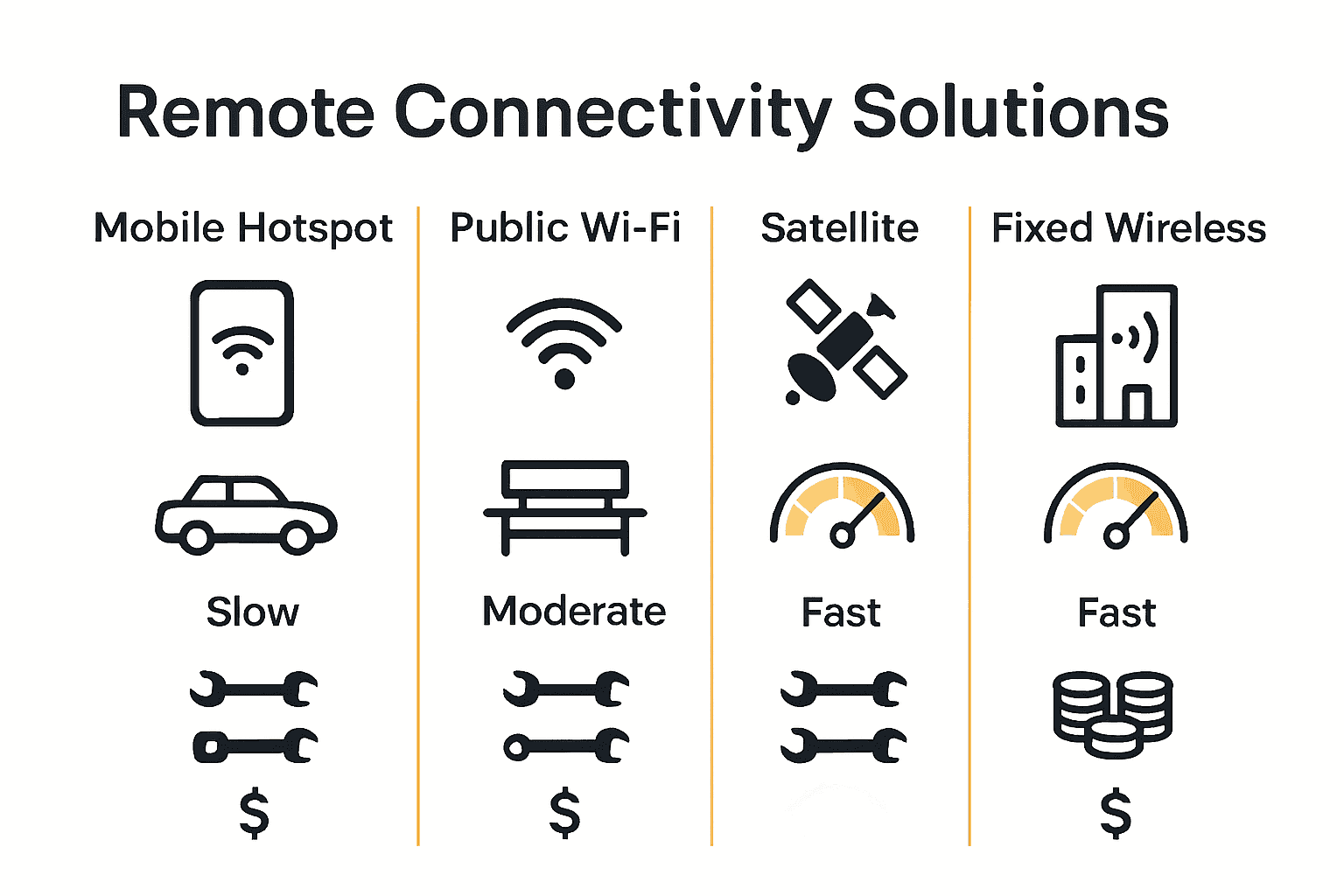
Connectivity Solutions Comparison:
| Solution Type | Mobility | Speed | Setup Complexity | Cost Efficiency |
|---|---|---|---|---|
| Mobile Hotspot | High | 4G/5G | Low | Moderate |
| Public Wi-Fi | Low | Variable | None | Low |
| Satellite | Medium | Low | High | High |
| Fixed Wireless | None | Moderate | Moderate | Low |
Professionals interested in understanding mobile hotspot advantages will find these devices increasingly critical in maintaining seamless remote work connectivity.
Cost, Coverage, and Common Pitfalls Explained
Mobile hotspot technologies present a complex ecosystem of financial and technical challenges for remote professionals. Frontiers in Computer Science highlights the intricate landscape of infrastructure deployment, revealing critical considerations beyond simple connectivity.
IARIA Conference research underscores the multifaceted challenges in hotspot usage, emphasizing that cost-effectiveness involves more than just monthly fees. Remote workers must navigate several critical factors:
- Data Limitations: Most plans include monthly data caps
- Network Performance: Actual speeds often differ from advertised rates
- Geographical Restrictions: Coverage varies dramatically by region
- Hidden Fees: Overage charges can significantly increase expenses
Hotspot Cost and Coverage Analysis:
| Factor | Budget Impact | Performance Implication |
|---|---|---|
| Base Plan | Low to Moderate | Standard Connectivity |
| Data Overages | High Risk | Potential Speed Throttling |
| Coverage Area | Variable | Reliability Dependent |
| Equipment Cost | One-time Expense | Technology Generation |
Professionals seeking to understand critical considerations before purchasing a mobile hotspot will benefit from strategic planning and comprehensive evaluation of their specific connectivity requirements.
Unlock Seamless Remote Work with Reliable Mobile Hotspots
The Complete Guide to Hotspots in Remote Work highlights the essential need for fast, secure, and flexible internet connectivity every remote professional faces today. Many struggle with inconsistent speeds, complex setups, or security risks when relying on public Wi-Fi or unstable networks. If you want instant connectivity with low latency and strong data encryption to support video calls, large file uploads, and uninterrupted productivity, it is time to upgrade your connectivity strategy.
SabertoothPro.com offers tailored solutions including high-speed 4G and 5G mobile hotspots, robust internet plans, and enterprise-grade security features designed specifically for remote work needs. Explore our selection of Titan WiFi Hotspot Plans to find a plan that fits your data demands and budget. Complement your setup with powerful Titan WiFi devices engineered for peak performance, portability, and ease of use.

Take control of your remote work experience now. Visit SabertoothPro.com to discover how our advanced connectivity solutions can eliminate downtime and keep you securely connected wherever you go. Don’t wait for connection challenges to slow you down when a smarter, faster mobile hotspot solution is just a click away.
Frequently Asked Questions
What is a mobile hotspot and how does it work?
A mobile hotspot is a device that connects to cellular networks and transforms mobile data signals into a shareable wireless internet access point. It enables laptops, tablets, and smartphones to connect to the internet from virtually anywhere.
What are the advantages of using a mobile hotspot for remote work?
Mobile hotspots offer instant connectivity, location independence, backup internet options, and enhanced security compared to public WiFi networks. They are essential for remote workers needing reliable internet access.
How do 4G and 5G hotspots differ in performance?
4G hotspots typically provide speeds ranging from 10-50 Mbps with latency of 20-30 ms, while 5G hotspots offer significantly faster speeds of 100-500 Mbps and lower latency of 1-10 ms, enhancing the user experience for remote professionals.
What security measures should I take when using a mobile hotspot?
To secure your mobile hotspot, use advanced encryption protocols, implement strong passwords and multi-factor authentication, create network isolation for personal and professional devices, and ensure regular updates of firmware and security patches.