


SMB Internet Plan Comparison Workflow: 5 Key Steps

Choosing the wrong internet plan costs more than money. When your team can’t join a video call, your cloud backup stalls, or your point-of-sale system freezes during peak hours, productivity takes a real hit. Many small and medium-sized businesses (SMBs) in the Mid-Atlantic region pick plans based on price alone, only to discover the service can’t handle their actual workload. This guide gives you a structured, evidence-based workflow to evaluate, compare, and select a business internet plan that supports your operations today and scales with your growth tomorrow.
Table of Contents
- Understand your business connectivity requirements
- Map provider availability and technology types in your area
- Score and compare plans using proven criteria
- Validate reliability, service guarantees, and business support
- Address edge cases and future-proof your connectivity
- Ready to compare? Get business-class connectivity support
- Frequently asked questions
Key Takeaways
| Point | Details |
|---|---|
| Benchmark your needs | Use speed benchmarks and future-proofing to define what connectivity your business truly requires. |
| Compare with weight | Apply a weighted scorecard to compare providers on speed, value, reliability, and support for objective decisions. |
| Check real business features | Verify business-grade guarantees like SLAs, static IPs, and 24/7 support, not just price or speed. |
| Prepare for edge scenarios | Know the rural, multi-site, and fast-growth solutions so your workflow fits any business context. |
Understand your business connectivity requirements
Before you compare a single plan, you need a clear picture of what your business actually demands from its connection. Start by counting your current headcount, the number of devices on your network, and the applications your team uses daily. Video conferencing, VoIP calls, cloud storage, and remote desktop tools all consume significant bandwidth, and the numbers add up fast.
For SMB internet reliability, matching your plan to your team size is the most practical starting point. The SMB speed benchmarks from HighSpeedInternet.com provide a solid baseline:
| Team size | Download speed | Upload speed |
|---|---|---|
| 1 to 20 users | 100 to 500 Mbps | 50 to 150 Mbps |
| 20 to 200 users | 500 to 1,000 Mbps | 200 to 500 Mbps |
Upload speed matters more than most businesses realize. If your team regularly pushes large files to the cloud, runs VoIP, or hosts video calls, a plan with weak upload performance will bottleneck your workflow even if the download speed looks impressive on paper.
Key factors to assess before shopping for plans:
- Current and projected headcount over the next 12 to 24 months
- Cloud platform usage such as Microsoft 365, Google Workspace, or AWS
- VoIP and video conferencing frequency and participant counts
- Remote or hybrid workers who connect through your business network
- IoT devices or point-of-sale systems that add to your bandwidth load
Understanding what business grade internet actually means will help you avoid plans that look good on the surface but fall short under real-world conditions. Use the ISP comparison methodology from HighSpeedInternet.com as a reference when evaluating provider claims.
Map provider availability and technology types in your area
Once you know your requirements, the next challenge is to see what solutions are physically available to your business. Not every technology type reaches every ZIP code, and Mid-Atlantic coverage varies significantly across Pennsylvania, Maryland, and New Jersey.

Start by entering your business address into provider coverage tools to confirm actual service availability. Then compare the technology types on offer. Each has real tradeoffs:
| Technology | Speed range | Reliability | Best for |
|---|---|---|---|
| Fiber | Up to 1,000+ Mbps | Excellent | High-demand offices |
| Cable | 100 to 500 Mbps | Good | Urban/suburban SMBs |
| 5G Fixed Wireless | 87 to 498 Mbps | Good to variable | Flexible or remote sites |
| Satellite | 25 to 220 Mbps | Moderate | Rural locations |
For Mid-Atlantic businesses, provider availability data shows that Xfinity cable reaches 71 to 88% of the region, Verizon Fios and 5G Home cover 56 to 70%, and T-Mobile 5G starts at around $30 per month with speeds ranging from 87 to 498 Mbps. Knowing which providers actually serve your address narrows your list quickly.
Understanding the full range of internet connection types helps you match technology to your priorities. If your location sits outside fiber coverage, reviewing fiber vs satellite options will clarify your best alternative.
Pro Tip: Always verify coverage at your specific street address, not just your city or ZIP code. Provider maps often show broader coverage than what’s actually available at the building level.
Score and compare plans using proven criteria
After narrowing your options to what’s available, strategic comparison ensures the plan truly aligns with your business needs. A weighted scorecard removes emotion from the decision and gives you an objective ranking.
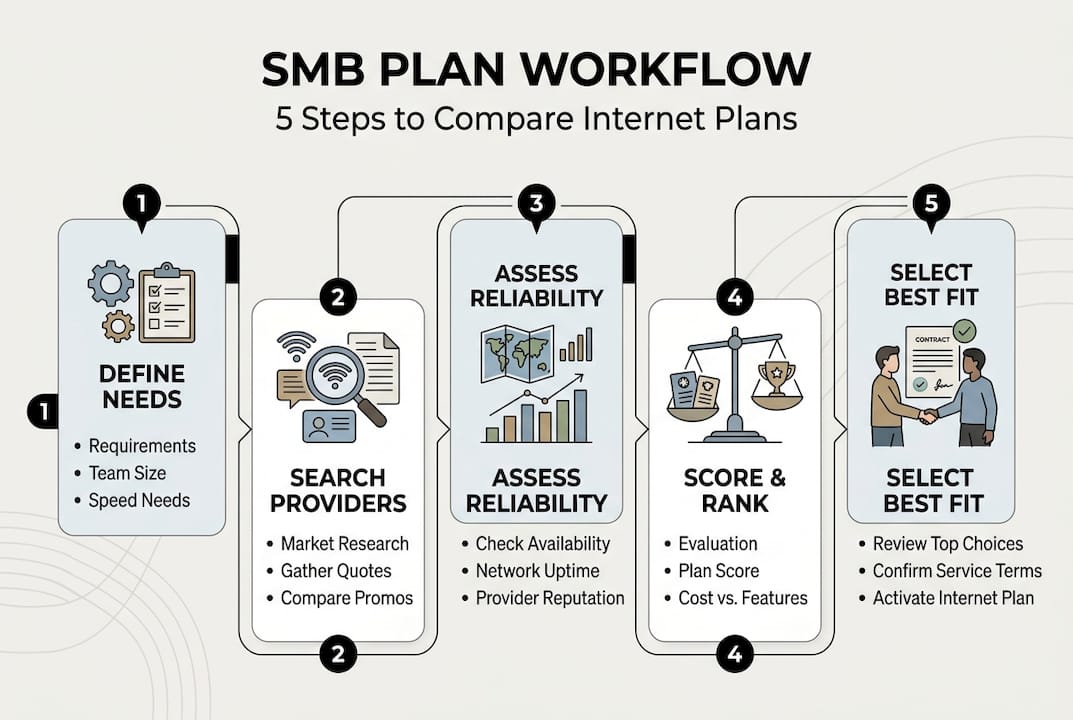
The ISP review methodology used by HighSpeedInternet.com applies these weights: Speed 30%, Value 25%, Reliability 20%, Support 15%, with the remaining 10% covering contract flexibility and extras. Apply this framework to every plan you’re considering.
Here’s a sample scorecard for three common Mid-Atlantic providers:
| Provider | Speed score | Value score | Reliability score | Support score | Total |
|---|---|---|---|---|---|
| Verizon Fios | 9/10 | 7/10 | 9/10 | 8/10 | 8.4 |
| Xfinity Business | 8/10 | 8/10 | 7/10 | 7/10 | 7.7 |
| T-Mobile 5G Biz | 7/10 | 9/10 | 7/10 | 7/10 | 7.5 |
Follow these steps to build your own scorecard:
- List every plan available at your address with its advertised speed and monthly cost.
- Calculate cost per Mbps to compare value across different speed tiers.
- Check contract length, early termination fees, and price lock guarantees.
- Identify bundled services such as static IPs, security tools, or managed Wi-Fi.
- Score each plan using the weighted criteria above and rank your top three.
Don’t overlook hidden costs. Installation fees, equipment rentals, and overage charges can add $50 to $200 per month to your actual bill. Reviewing enterprise connectivity trends will also show you where the market is heading, so you don’t lock into a plan that becomes outdated within your contract term. For a broader view of what SMBs should expect from providers, telecom services guidance from Compass MSP is a useful reference.
Pro Tip: Ask providers directly about promotional pricing versus standard rates. Many advertised prices apply only to the first 12 months. Get the full-term cost in writing before signing.
Validate reliability, service guarantees, and business support
With the plan selected on paper, it’s time to double-check the provider’s true ability to deliver consistent, business-grade connectivity. A plan that looks great in a brochure can still leave you without service during a critical moment if the provider doesn’t back it up with real guarantees.
“Prioritize SLAs with 99.9% uptime guarantees, static IP availability, 24/7 business support, and avoid residential plans for any business-critical use. Always negotiate quotes before signing.” — Earthlink Business
A service level agreement (SLA) is a formal commitment from the provider that defines uptime guarantees, response times, and compensation if they fail to deliver. For most SMBs, 99.9% uptime is the minimum acceptable standard. That translates to less than nine hours of downtime per year.
Key items to verify before signing any business internet contract:
- SLA with 99.9% or higher uptime and clear remedies for outages
- Static IP addresses if you run servers, VPNs, or remote access tools
- 24/7 dedicated business support with a direct line, not a consumer queue
- Business-grade equipment included or available for lease
- Post-installation speed testing to confirm you’re receiving advertised performance
Residential internet plans are not designed for business use. They lack SLAs, prioritize consumer traffic, and offer no guaranteed response time when something breaks. Reviewing business internet guarantees from TechCollective gives you a clear picture of what separates consumer from business-grade service. You can also revisit strategies to improve internet reliability once your plan is active.
Address edge cases and future-proof your connectivity
Some businesses face extra challenges. Address these proactively to make your workflow truly comprehensive. Rural SMBs, multi-location companies, and fast-growing teams each need tailored adjustments to the standard comparison process.
For businesses in rural or low-fiber areas, 5G and satellite options like Starlink have become viable primary connections, not just backup solutions. Multi-location businesses need providers that offer scalable contracts and centralized management across sites. Fast-growing companies should prioritize plans with upgrade flexibility built into the contract.
Use this checklist to catch edge cases before you commit:
- Rural location: Confirm 5G fixed wireless or satellite coverage using the rural connectivity checklist
- Mission-critical operations: Build in a secondary connection using 5G business hotspots as a failover
- Multiple sites: Ask providers about multi-location pricing and centralized billing
- Rapid growth: Confirm you can upgrade speed tiers without penalty mid-contract
- IoT or fleet connectivity: Verify the plan supports device-level management and static IPs
For businesses in underserved areas, exploring rural internet solutions can surface options that standard provider searches miss. The plans for business comparison tool from HighSpeedInternet.com is also useful for checking rural availability by address.
Pro Tip: Even if your primary connection is reliable, a 5G backup plan costing $30 to $50 per month can prevent thousands of dollars in lost productivity during an outage. Redundancy is not a luxury for businesses that depend on cloud tools.
Ready to compare? Get business-class connectivity support
Following this workflow puts your business in a strong position to choose a plan that delivers real performance, not just a good price on paper. The difference between a plan that works and one that holds your team back often comes down to the details: upload speed, SLA terms, support quality, and room to grow.

Sabertooth Pro specializes in helping Mid-Atlantic SMBs navigate exactly this process. As a wireless internet provider with deep regional expertise, we support businesses from initial needs assessment through installation and ongoing management. Whether you need high speed internet in Harford County or a multi-site connectivity strategy across PA, MD, and NJ, our team brings the technical knowledge and local coverage insight to match you with the right solution. Visit Sabertooth Pro to explore service options, wireless backup solutions, and IoT integration built for business.
Frequently asked questions
How do I evaluate internet speeds for my small business?
Match your team size to established benchmarks: 100 to 500 Mbps download for up to 20 users, and 500 to 1,000 Mbps for larger teams. Always factor in upload speed if your team relies on cloud platforms or VoIP.
What is the most reliable type of internet for SMBs in the Mid-Atlantic?
Fiber delivers the best combination of speed and symmetrical performance where available. Cable and 5G fixed wireless are strong alternatives depending on your location, though cable can experience congestion during peak hours.
How do I ensure my business internet plan includes proper support?
Require a written SLA with at least 99.9% uptime and confirm 24/7 dedicated business support before signing. Avoid residential plans entirely, as they carry no service guarantees for business use.
What are the best options for SMBs in rural Mid-Atlantic areas?
If fiber and cable don’t reach your location, 5G or satellite solutions like Starlink are now reliable primary options. Prioritize providers with proven rural business deployments and flexible contract terms.