


What is multi-site connectivity: guide for IT leaders

Many IT decision-makers assume that providing internet access at each location solves their connectivity challenges. However, true multi-site connectivity requires far more than basic internet links. It demands carefully planned network architecture that enables seamless communication and collaboration across distributed sites. This guide clarifies the essential concepts, technologies, and practical applications that IT leaders in mid-to-large organizations need to understand when building reliable multi-site connectivity infrastructure.
Table of Contents
- Key takeaways
- Understanding multi-site connectivity: definition and core benefits
- Key technologies and architectures powering multi-site connectivity
- Common challenges and security considerations in multi-site connectivity
- Implementing multi-site connectivity: strategies for IT leaders
- Explore Sabertooth Pro’s connectivity solutions
- Frequently asked questions
Key Takeaways
| Point | Details |
|---|---|
| Unified multisite architecture | True connectivity requires a planned network design that enables seamless communication across distributed sites, not just separate internet links. |
| Secure high speed links | Private network connections and unified security policies enable safe, fast data exchange across multiple sites. |
| Technology tradeoffs | Choosing MPLS, SD WAN, dedicated fiber, or wireless depends on site size, bandwidth needs, cost, and security requirements. |
| Plan for growth | Assess current needs and anticipated expansion to avoid costly upgrades when adding new sites. |
Understanding multi-site connectivity: definition and core benefits
Multi-site connectivity links multiple organizational locations through secure, high-speed networks that function as a unified infrastructure. Unlike basic internet connections at each site, true multi-site connectivity creates a cohesive network environment where resources, applications, and data flow seamlessly between locations. This infrastructure enables distributed teams to collaborate as effectively as if they occupied the same building.
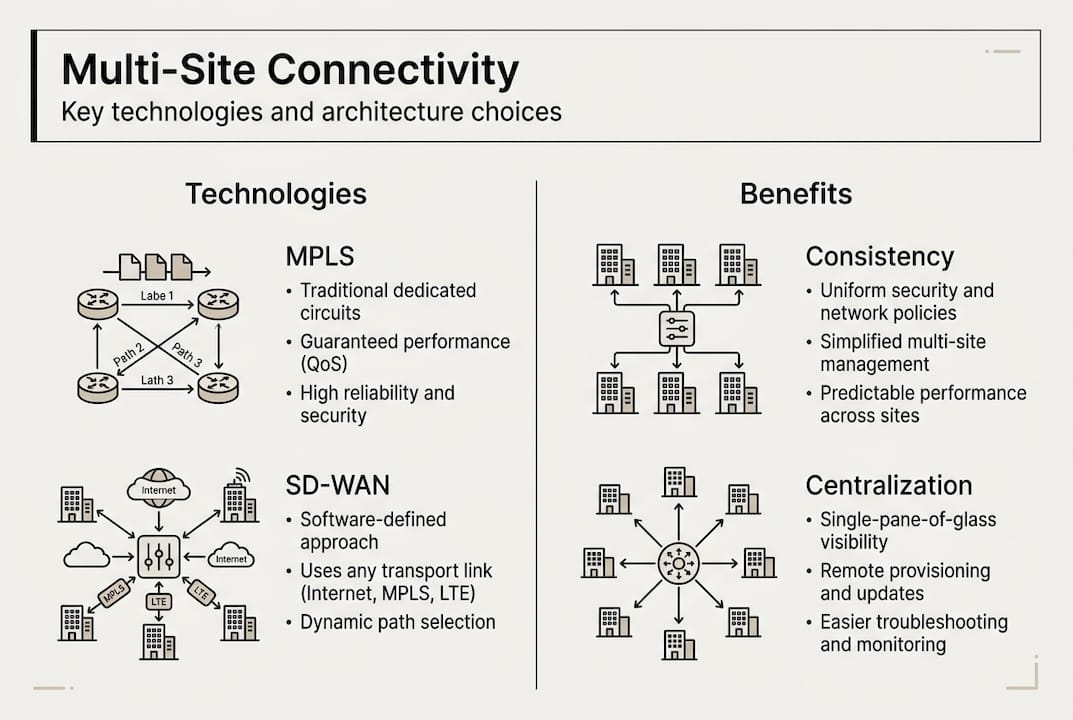
The core benefits extend far beyond simple data transfer. Organizations gain consistent communication channels, centralized resource access, and improved collaboration capabilities. Your teams can access shared applications, databases, and storage systems with minimal latency, regardless of their physical location. This consistency transforms how distributed organizations operate, enabling real-time collaboration and unified workflows.
Basic WAN or internet-only connectivity creates significant challenges that proper multi-site connectivity addresses. Sites operating on separate internet connections face security vulnerabilities, inconsistent performance, and difficulty sharing resources. Data transfers between locations must traverse the public internet, exposing sensitive information to potential threats. Application performance suffers from unpredictable latency and bandwidth limitations.
The advantages of implementing robust multi-site connectivity include:
- Increased uptime through redundant connections and failover capabilities
- Streamlined IT management with centralized control and monitoring
- Better user experience through consistent performance across all locations
- Enhanced security with private network links and unified security policies
- Reduced costs by optimizing bandwidth usage and eliminating redundant systems
- Improved disaster recovery capabilities through distributed data replication
Pro Tip: Assess both your current connectivity requirements and anticipated growth over the next three to five years before selecting solutions. Organizations that plan only for immediate needs often face costly upgrades when expanding operations or adding new sites.
Key technologies and architectures powering multi-site connectivity
Several core technologies enable multi-site connectivity, each offering distinct characteristics suited to different organizational needs. MPLS provides dedicated, private network connections with guaranteed performance levels and quality of service. SD-WAN offers advantages in flexibility and manageability by creating virtual networks over multiple connection types. Dedicated fiber delivers exceptional bandwidth and reliability for organizations with high data transfer requirements. Fixed wireless and 5G solutions provide rapid deployment and cost-effective connectivity, particularly for remote or temporary sites.

The choice between these technologies depends on your specific operational requirements, budget constraints, and site characteristics. Understanding the trade-offs helps you build an infrastructure that balances performance, cost, and reliability.
| Technology | Pros | Cons | Typical Use Cases | Cost Level |
|---|---|---|---|---|
| MPLS | Guaranteed performance, high reliability, excellent QoS | Expensive, long deployment times, limited flexibility | Large enterprises, mission-critical applications, voice/video | High |
| SD-WAN | Cost-effective, flexible, easy management, quick deployment | Performance depends on underlying connections | Multi-site businesses, hybrid cloud environments | Medium |
| Dedicated Fiber | Highest bandwidth, lowest latency, most reliable | Very expensive, limited availability, long installation | Data centers, headquarters, high-bandwidth sites | Very High |
| Fixed Wireless | Quick deployment, good for remote areas, scalable | Weather-dependent, line-of-sight requirements | Rural locations, temporary sites, backup connections | Low-Medium |
| 5G | High speed, low latency, wide coverage, mobile capable | Coverage varies, potential congestion, emerging technology | Mobile operations, IoT deployments, rapid deployment scenarios | Medium |
Different organizational profiles benefit from specific architecture approaches. Small to mid-sized organizations with 3-10 sites often find SD-WAN over broadband internet provides optimal cost-performance balance. Large enterprises with 10+ sites and high security requirements typically implement MPLS for core locations supplemented by SD-WAN for smaller offices. Organizations in rural areas or with challenging geography leverage wireless routers and fixed wireless solutions where fiber availability is limited.
Architecture selection also considers application requirements. Real-time applications like VoIP and video conferencing demand low latency and consistent performance, favoring MPLS or dedicated fiber. Cloud-based applications with less stringent latency requirements work well over SD-WAN. Data replication and backup operations can utilize lower-cost connections during off-peak hours.
Pro Tip: Consider hybrid architectures that combine multiple technologies for optimal resilience and cost efficiency. Using SD-WAN to manage both MPLS and broadband connections provides failover capabilities while controlling costs. Adding wireless backup connections ensures business continuity even when primary links fail.
Common challenges and security considerations in multi-site connectivity
Organizing connectivity across multiple sites introduces operational complexities that require careful attention. Downtime risks multiply as your network spans more locations and connection types. Managing diverse technologies from different vendors creates integration challenges and increases the expertise required from your IT team. Bandwidth allocation becomes more complex as you balance competing demands across sites while controlling costs.
Security and reliability represent critical challenges in multi-site networks. Each connection point creates a potential vulnerability that attackers might exploit. Maintaining consistent security policies across all sites while accommodating local requirements demands robust planning and enforcement. Common issues include latency spikes, unexpected downtime, and unauthorized access attempts that compromise network integrity.
Implement these five security best practices to protect your multi-site network:
- Deploy end-to-end encryption for all data traversing network links, ensuring confidentiality even if traffic is intercepted
- Implement network segmentation to isolate different types of traffic and limit the impact of security breaches
- Establish continuous monitoring with automated alerts for unusual traffic patterns, performance degradation, or security events
- Use site-to-site VPNs to create secure tunnels over public internet connections when private links are unavailable
- Enforce strict access control with multi-factor authentication and role-based permissions for all network management functions
Multi-site connectivity security requires ongoing vigilance and regular updates to address emerging threats. Organizations that treat security as a one-time implementation rather than a continuous process expose themselves to significant risks as attack methods evolve.
Latency and performance issues affect user experience and application functionality across distributed sites. Geographic distance between locations introduces unavoidable signal propagation delays. Network congestion during peak usage periods degrades performance for all users. Application design that assumes local network speeds often fails when deployed across WAN links.
Address performance challenges through technology selection and policy implementation. Choose connection types with sufficient bandwidth headroom to accommodate peak usage and growth. Implement quality of service policies that prioritize business-critical applications over less time-sensitive traffic. Deploy WAN optimization technologies that compress data, cache frequently accessed content, and accelerate application protocols. Consider placing application servers and data storage closer to user concentrations to minimize latency.
Monitor network performance continuously to identify issues before they impact users. Establish baseline performance metrics for each site and connection. Set alerts for deviations that indicate potential problems. Review performance data regularly to identify trends and plan capacity upgrades proactively.
Implementing multi-site connectivity: strategies for IT leaders
Successful multi-site network deployment follows a structured approach that minimizes disruption while ensuring reliable results. Breaking the project into distinct phases helps manage complexity and allows for course corrections based on real-world experience.
Follow these project phases for effective implementation:
- Needs assessment: Document current connectivity status, identify pain points, gather bandwidth requirements, and define success criteria for each site
- Technology selection: Evaluate available technologies against your requirements, considering performance, cost, scalability, and vendor capabilities
- Vendor evaluation: Request proposals from multiple providers, compare offerings on total cost of ownership, and verify references from similar organizations
- Pilot testing: Deploy solutions at one or two representative sites to validate performance, identify integration issues, and refine procedures before full rollout
- Phased rollout: Implement connectivity upgrades systematically across remaining sites, applying lessons learned from pilot phase
- Ongoing monitoring: Establish performance baselines, configure alerting for issues, and schedule regular reviews of network health and capacity utilization
Staff training and stakeholder communication ensure smooth adoption of new connectivity infrastructure. Your IT team needs thorough training on managing and troubleshooting the new technologies. End users require clear communication about changes, expected benefits, and any temporary disruptions during implementation. Executive stakeholders need regular updates on project progress, realized benefits, and any adjustments to timeline or budget.
Incorporate scalability and future-proofing into your initial design to avoid costly upgrades as your organization grows. Select technologies and vendors that support easy capacity increases without replacing core infrastructure. Design network architecture with room for additional sites and bandwidth growth. Choose solutions that integrate with emerging technologies like cloud services and IoT devices.
Pro Tip: Schedule regular reviews of network performance and business requirements, updating configurations as your organization evolves. Technology capabilities improve rapidly, and your connectivity needs change as you adopt new applications and expand operations. Annual assessments help identify optimization opportunities and ensure your infrastructure continues meeting business goals.
Document your network architecture, configurations, and procedures thoroughly. This documentation proves invaluable when troubleshooting issues, onboarding new IT staff, or planning upgrades. Include network diagrams, equipment configurations, vendor contact information, and step-by-step procedures for common tasks.
Build relationships with your connectivity vendors and service providers. Strong vendor relationships facilitate faster problem resolution, provide early access to new capabilities, and often result in better pricing on upgrades or additional services. Regular business reviews with vendors help ensure they understand your evolving needs and can recommend appropriate solutions.
Explore Sabertooth Pro’s connectivity solutions
Building reliable multi-site connectivity requires expertise in both technology selection and implementation strategy. Sabertooth Pro specializes in providing tailored connectivity solutions that address the unique challenges of distributed organizations. Our wireless internet offerings deliver high-speed connectivity to sites where traditional wired options are limited or cost-prohibitive.

Our comprehensive IT and IoT solutions extend beyond basic connectivity to include network security, cloud integration, and device management capabilities. We understand that modern multi-site connectivity must support diverse requirements from traditional office applications to IoT sensors and mobile devices. Explore our IoT data plans designed specifically for organizations deploying connected devices across multiple locations. Let our team help you design and implement a connectivity strategy that supports your current operations while positioning you for future growth.
Frequently asked questions
What does multi-site connectivity mean in practical terms?
Multi-site connectivity creates a unified network infrastructure linking all your organizational locations through secure, high-performance connections. This enables seamless resource sharing, consistent application access, and reliable communication between sites as if they were part of a single local network.
How is it different from simply having internet at multiple offices?
Basic internet connections at each office create isolated networks that must communicate through the public internet, introducing security risks and performance inconsistencies. True multi-site connectivity establishes private network links with guaranteed performance, enhanced security, and centralized management that internet-only solutions cannot provide.
What are typical technologies used to connect multiple sites?
Organizations commonly deploy MPLS for guaranteed performance, SD-WAN for cost-effective flexibility, dedicated fiber for maximum bandwidth, or wireless solutions for rapid deployment and remote locations. Many successful implementations combine multiple technologies to balance performance requirements with budget constraints.
How can organizations ensure security across multiple sites?
Implement end-to-end encryption for all inter-site traffic, deploy network segmentation to isolate different traffic types, and establish continuous monitoring with automated threat detection. Combine these technical controls with strict access policies, regular security audits, and staff training on security best practices.
What factors should be considered when choosing a multi-site connectivity solution?
Evaluate your bandwidth requirements at each site, application performance needs, security and compliance obligations, budget constraints, and growth projections. Consider geographic factors like site locations and available connectivity options, plus organizational factors like IT staff expertise and vendor support requirements for long-term success.