


What is multi-site networking: guide for IT leaders 2026

Multi-site networking connects your dispersed business locations into one unified digital ecosystem. Many IT leaders assume implementing these networks requires massive budgets and specialized expertise, but modern solutions have democratized access. This guide walks you through multi-site networking fundamentals, proven architectures, real-world benefits, common pitfalls, and actionable implementation strategies tailored for healthcare facilities managing patient data, retail chains coordinating inventory, and logistics operations tracking shipments in real time across dozens of sites.
Table of Contents
- Understanding Multi-Site Networking Fundamentals
- Common Architectures And Technologies In Multi-Site Networking
- Benefits And Challenges Of Multi-Site Networking
- Implementing Multi-Site Networking: Best Practices
- Multi-Site Networking Solutions From Sabertooth Pro
- FAQ
Key takeaways
| Point | Details |
|---|---|
| Multi-site networking defined | Connects geographically dispersed business locations to enable seamless data sharing and unified communication across your enterprise. |
| Core technologies | SD-WAN, MPLS, and VPN solutions each offer distinct advantages for connecting sites with varying security, cost, and performance trade-offs. |
| Primary benefits | Centralized IT management, improved disaster recovery, streamlined operations, and consistent user experience across all locations. |
| Security challenges | Protecting multiple entry points requires layered defenses including encryption, firewalls, access controls, and continuous monitoring. |
| Implementation success factors | Phased deployment, thorough site assessment, bandwidth planning, and regular performance reviews ensure smooth rollout and ongoing optimization. |
Understanding multi-site networking fundamentals
Multi-site networking creates a cohesive digital infrastructure that links your business locations, whether you operate five retail stores or fifty healthcare clinics. This connectivity framework allows employees at any site to access centralized applications, share files instantly, and communicate through unified systems without geographical barriers.
Businesses invest in cloud networking connectivity because isolated locations create operational silos. Healthcare organizations need instant access to patient records across multiple facilities. Retail chains require real-time inventory visibility to prevent stockouts and optimize distribution. Logistics companies depend on live tracking data flowing between warehouses, distribution centers, and headquarters.
The technical foundation includes several key components working together. Wide Area Networks (WANs) form the backbone connecting distant sites. Virtual Private Networks (VPNs) create encrypted tunnels for secure data transmission. Routers direct traffic efficiently between locations. Firewalls protect each entry point from unauthorized access.
These elements combine to solve practical business problems. Your finance team processes payroll from headquarters while branch managers access the same system simultaneously. Customer service representatives retrieve order histories regardless of which location placed the order. IT administrators deploy software updates across all sites from a central console.
Consider the bandwidth demands carefully. Video conferencing between sites consumes significant capacity. Cloud application usage grows annually. File transfers for large datasets spike during specific business cycles.
Pro Tip: Plan for 30% more bandwidth than current usage patterns suggest to accommodate organic growth and unexpected traffic surges without performance degradation.
Your network architecture choice impacts everything from monthly costs to troubleshooting complexity. Understanding these fundamentals helps you evaluate vendor proposals critically and ask the right questions during planning discussions.
Common architectures and technologies in multi-site networking
Three primary WAN architectures dominate multi-site deployments, each suited to different organizational needs. Point-to-point connections link two sites directly, ideal for simple two-location businesses or dedicated high-security links. Hub-and-spoke routes all traffic through a central headquarters, simplifying management but creating a potential bottleneck. Full mesh connects every site to every other site, maximizing redundancy and performance at higher cost and complexity.
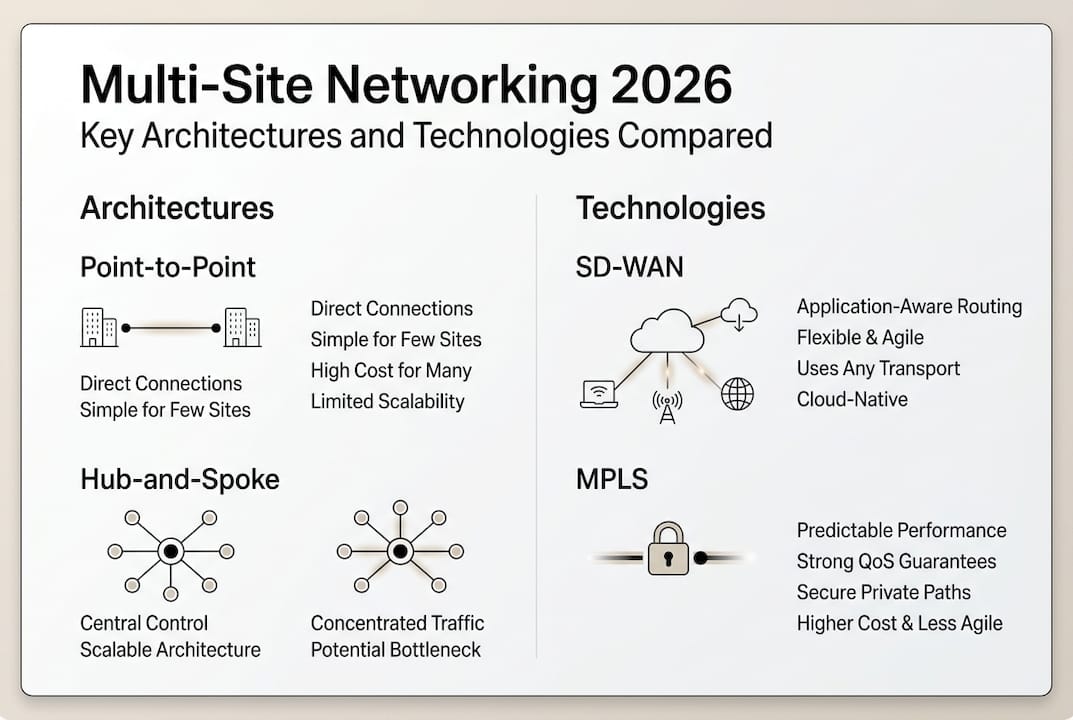
The technology connecting these sites varies dramatically in cost, performance, and management overhead. MPLS (Multiprotocol Label Switching) offers guaranteed bandwidth and quality of service but carries premium pricing. SD-WAN (Software-Defined WAN) provides flexible, cost-effective connectivity using internet connections for SMBs with intelligent traffic routing. Traditional VPNs deliver basic encrypted connectivity over public internet at the lowest cost.
| Technology | Primary Advantage | Main Drawback | Best Use Case | | — | — | | MPLS | Guaranteed performance and uptime | High monthly costs, long deployment times | Mission-critical applications requiring consistent latency | | SD-WAN | Cost efficiency, centralized management | Depends on underlying internet quality | Multi-site businesses seeking flexibility and visibility | | VPN | Low cost, simple setup | Limited scalability, performance variability | Small deployments or temporary connections | | Hybrid | Combines multiple technologies for redundancy | Increased complexity | Organizations prioritizing uptime over simplicity |
Wireless connectivity has transformed branch networking. 4G LTE and 5G provide rapid deployment for new locations without waiting for fiber installation. Wireless serves as primary connectivity in rural areas or backup for wired connections in urban sites. However, wired connections still deliver superior consistency for high-traffic locations.
Hardware selection impacts long-term success. Enterprise-grade routers handle traffic prioritization and failover automatically. Next-generation firewalls inspect encrypted traffic without performance penalties. Managed switches enable VLAN segmentation for security. Applying smart networking principles ensures these components work together efficiently.
Your technology stack should align with business priorities. Financial services prioritize security and compliance. Retail emphasizes point-of-sale reliability. Healthcare balances HIPAA requirements with clinical workflow needs.
Pro Tip: SD-WAN adoption accelerated 47% among mid-market businesses in 2025 due to its ability to reduce WAN costs by 40% while improving application visibility and control.
Evaluate vendors on their ability to support your chosen architecture with proven deployment experience in your industry. Request case studies from similar organizations before committing to multi-year contracts.
Benefits and challenges of multi-site networking
Multi-site networking delivers measurable operational improvements that justify the investment. Improved communication eliminates the friction of disconnected systems. Employees collaborate through unified platforms regardless of location. Centralized data access means your sales team views the same customer information whether they work from Boston or Phoenix. Streamlined operations reduce redundant IT infrastructure and consolidate vendor relationships. Enhanced disaster recovery protects business continuity when one site experiences outages.

Quantifiable benefits appear across departments. IT teams manage all locations from a single console instead of traveling between sites. Finance processes transactions faster with real-time data synchronization. Customer service resolves issues quickly by accessing complete order histories. Marketing launches campaigns simultaneously across all locations.
However, significant challenges require proactive planning. Securing multiple sites multiplies your attack surface. Each location represents a potential entry point for cyber threats. Network security best practices become non-negotiable when protecting distributed infrastructure. Performance consistency varies based on each site’s connectivity quality. Managing diverse hardware and software across locations creates version control headaches.
Three critical challenges demand immediate attention:
- Security vulnerabilities multiply with each new location, requiring comprehensive endpoint protection, network segmentation, and continuous monitoring to prevent breaches that could compromise your entire organization.
- Performance bottlenecks emerge when bandwidth planning fails to account for peak usage periods, causing application slowdowns that frustrate users and reduce productivity across multiple sites simultaneously.
- Configuration drift occurs when individual sites modify settings independently, creating inconsistent security postures and troubleshooting nightmares that consume IT resources and introduce compliance risks.
Secure network architecture is essential to protect multi-site businesses from increasingly sophisticated cyber threats that specifically target distributed organizations with inconsistent security policies.
Mitigate these risks through structured approaches. Implement zero-trust security models that verify every access request. Deploy centralized configuration management to prevent drift. Establish clear change control processes requiring approval before site-level modifications.
IT staff training becomes crucial as your network complexity grows. Invest in certification programs for your team. Document standard operating procedures for common scenarios. Conduct regular security audits to identify vulnerabilities before attackers exploit them.
The benefits outweigh challenges when you plan thoroughly and execute systematically. Organizations that rush deployment without addressing security and performance fundamentals face costly remediation later.
Implementing multi-site networking: best practices
Successful multi-site networking starts with comprehensive site assessment. Document current bandwidth usage at each location. Identify critical applications requiring prioritization. Map data flows between sites to understand traffic patterns. Survey physical infrastructure to determine connectivity options available at each address.
Bandwidth estimation requires understanding both current needs and future growth. Calculate baseline requirements by monitoring existing usage for 30 days. Add capacity for planned initiatives like video conferencing rollouts or cloud migration. Factor in seasonal spikes if your business experiences cyclical demand.
Phased deployment reduces risk and allows course correction. Start with a pilot connecting two or three sites. Test thoroughly under realistic conditions. Gather user feedback and measure performance metrics. Refine your approach based on lessons learned before expanding to remaining locations.
Your security checklist must cover multiple layers:
- Encrypt all data in transit using current TLS standards to prevent interception during transmission between sites.
- Deploy next-generation firewalls at every location with unified policy management to ensure consistent protection.
- Implement multi-factor authentication for all remote access to verify user identity beyond simple passwords.
- Segment networks using VLANs to isolate guest traffic, IoT devices, and sensitive systems from general corporate networks.
- Enable logging and monitoring across all sites to detect anomalies and respond to security incidents rapidly.
Network monitoring tools provide visibility essential for proactive management. These solutions track performance continuously and alert your team to issues before users complain.
| Tool Category | Key Features | Primary Benefit |
|---|---|---|
| Performance Monitoring | Bandwidth utilization, latency tracking, packet loss detection | Identifies bottlenecks before they impact users |
| Security Information and Event Management | Log aggregation, threat detection, compliance reporting | Centralizes security visibility across all sites |
| Application Performance Management | Transaction tracing, user experience monitoring, dependency mapping | Pinpoints application issues to specific network or server problems |
| Network Configuration Management | Automated backups, change tracking, compliance verification | Prevents configuration drift and accelerates troubleshooting |
Improving internet reliability SMBs through redundant connections and automatic failover protects against single points of failure. Deploy dual internet connections at critical sites using different providers and technologies. Configure SD-WAN to route traffic automatically when primary links fail.
Hardware standardization simplifies management and reduces training requirements. Select wireless router options for business that support centralized configuration and firmware updates. Maintain spare equipment at headquarters for rapid deployment when hardware fails.
Documentation prevents institutional knowledge loss. Create network diagrams showing all connections and devices. Write runbooks for common troubleshooting scenarios. Record configuration standards and approved vendor lists.
Pro Tip: Schedule quarterly network performance reviews combining automated metrics with user feedback surveys to identify emerging issues and prioritize infrastructure investments based on actual business impact.
Change management processes prevent well-intentioned modifications from causing outages. Require testing in lab environments before production deployment. Schedule changes during maintenance windows with rollback plans ready. Communicate timing to affected users in advance.
Your implementation timeline should balance urgency with thoroughness. Rushing creates technical debt that costs more to fix later. Moving too slowly allows competitors to gain operational advantages.
Multi-site networking solutions from Sabertooth Pro
Building reliable multi-site networks demands expertise in connectivity technologies and industry-specific requirements. Sabertooth Pro delivers wireless internet provider services designed for businesses operating across multiple locations, from healthcare clinics requiring HIPAA-compliant connectivity to retail chains needing POS failover protection.

Our iot solutions extend beyond basic connectivity. We provide device management platforms that scale with your deployment, security frameworks protecting IoT endpoints, and analytics tools extracting actionable insights from connected devices. Logistics companies leverage our fleet connectivity solutions for real-time tracking. Retailers deploy our secure Wi-Fi infrastructure to enhance customer experiences while protecting payment data.
The IT and IoT solutions portfolio includes SD-WAN implementation, cloud integration, and ongoing network management tailored to your operational requirements. Our team conducts thorough site assessments, designs architectures matching your growth trajectory, and provides 24/7 support ensuring your multi-site network delivers consistent performance. Contact us for a customized network assessment that identifies optimization opportunities specific to your industry and location profile.
FAQ
What network technology is best for multi-site businesses?
SD-WAN has become the preferred choice for most multi-site organizations in 2026 due to its cost efficiency, centralized management, and ability to intelligently route traffic across multiple connection types. It works particularly well for businesses with 5+ locations seeking to reduce MPLS costs while improving visibility. However, mission-critical applications in finance or healthcare may still justify MPLS for guaranteed performance, and smaller deployments might find traditional VPNs sufficient for basic connectivity needs.
How do you ensure security across multiple network locations?
Implement a zero-trust security model that verifies every access request regardless of source location. Deploy next-generation firewalls with unified policy management at all sites to ensure consistent protection. Encrypt all data in transit using current TLS standards and require multi-factor authentication for remote access. Segment networks using VLANs to isolate different traffic types. Continuous monitoring through centralized SIEM platforms detects anomalies across your entire infrastructure, enabling rapid response to potential threats before they escalate.
What steps improve network uptime for multi-site organizations?
Deploy redundant internet connections at critical sites using different providers and technologies to eliminate single points of failure. Configure automatic failover through SD-WAN so traffic reroutes instantly when primary links fail. Implement proactive monitoring that alerts your team to performance degradation before complete outages occur. Maintain standardized hardware with spare equipment ready for rapid deployment. Schedule regular maintenance during planned windows with proper rollback procedures to minimize unplanned downtime that disrupts business operations.
How does SD-WAN differ from traditional WAN connections?
SD-WAN uses software to intelligently manage traffic across multiple connection types including broadband internet, LTE, and MPLS, while traditional WANs typically rely on expensive dedicated MPLS circuits. SD-WAN provides centralized visibility and control through cloud-based management consoles, whereas traditional WANs require site-by-site configuration. The software-defined approach enables dynamic path selection based on real-time application requirements and network conditions, optimizing performance and cost simultaneously. Traditional WANs offer guaranteed bandwidth but lack the flexibility and cost efficiency that SD-WAN delivers for modern multi-site businesses.
What are cost considerations when scaling multi-site networks?
Bandwidth costs multiply with each location, making technology choice critical for budget management. SD-WAN reduces ongoing expenses by leveraging commodity internet instead of premium MPLS circuits. Hardware standardization lowers maintenance costs and simplifies spare parts inventory. Centralized management reduces IT labor requirements compared to managing sites individually. Factor in security tool licensing that often scales by user count or site quantity. Plan for periodic hardware refresh cycles every 3-5 years to maintain performance and security. Hidden costs include training staff on new technologies and potential consultant fees during initial deployment phases.